
DB Security
Introduction to Transparent Data Encryption (TDE) and Steps to Configure It in Oracle Database 19c
prayank waluskar
This blog describes Oracle TDE and provides step-by-step instructions for configuring TDE in Oracle Database 19c using file system based location.
Data security is very important in today’s database systems. Companies store sensitive information such as customer details, financial records, healthcare information, and other confidential business data in databases. Protecting this data from unauthorized access helps organizations meet security and compliance requirements and ensures that business operations continue without disruption.
Oracle Transparent Data Encryption (TDE) is a security feature that protects sensitive data stored in Oracle databases by encrypting data at rest. TDE encrypts database files, tablespaces, columns, and backups while allowing authorized users and applications to access data without requiring any changes to application code.
What is Transparent Data Encryption (TDE)?
Transparent Data Encryption (TDE) is an Oracle Database security feature designed to protect data at rest. It does this by encrypting database files and, in some cases, database objects, while remaining completely transparent to applications and authorised users. The encryption and decryption processes occur transparently without application modifications.
From an operational perspective, applications continue to read and write data as normal. From a security perspective, if someone gains access to database files, storage snapshots, or backups without authorisation, the data is unreadable. This makes TDE a key tool in security, compliance, and cloud security.
TDE protects:
- Database tablespaces
- Table columns
- Data files
- RMAN backups
- Archived redo logs (when configured)
The primary purpose of TDE is to protect data at rest, ensuring that stolen database files, backups, or storage media cannot be read without the encryption keys.
Advantages of TDE
- Data-at-Rest Protection
Encrypted data files cannot be accessed directly from the operating system without the encryption key. - Regulatory Compliance
TDE helps organizations meet compliance requirements such as:
• PCI-DSS
• HIPAA
• GDPR
• SOX - Transparent Operation
Applications continue to function normally because Oracle automatically encrypts and decrypts data. - Centralized Key Management
Encryption keys are stored in a secure keystore (wallet) external to the database.
TDE Architecture
Oracle Transparent Data Encryption (TDE) uses two levels of encryption keys to protect data:
1.Data Encryption Key (DEK)
This key is used to encrypt and decrypt the actual data stored in the database.
2.TDE Master Encryption Key
This key is stored securely in an external keystore (wallet /Oracle Key Vault “OKV”).
It is used to encrypt the Data Encryption Keys (DEKs).
By separating the encryption keys from the data, TDE provides an additional layer of security and makes it easier to manage and rotate encryption keys when required.
Steps to Configure Transparent Data Encryption (TDE) in Oracle Database 19c
Now, let’s start to implement the TDE!!!!!!
1.Create Wallet Directory
Create the wallet location path on the server and setup it’s permissions.
mkdir -p /data/app/oracle/wallet
chmod 700 /data/app/oracle/wallet
chown oracle:oinstall /data/app/oracle/wallet
2.Setup WALLET_ROOT parameter
Run the below set of commands to setup the WALLET_ROOT parameter.
Note* – WALLET_ROOT parameter is static parameter and requires database restart.
show parameter WALLET_ROOT;
ALTER SYSTEM SET WALLET_ROOT='/data/app/oracle/wallet' SCOPE=SPFILE;Code language: JavaScript (javascript)
Now, bring down the database
SHUTDOWN IMMEDIATE;
STARTUP;
Now again check the parameter
show parameter WALLET_ROOT;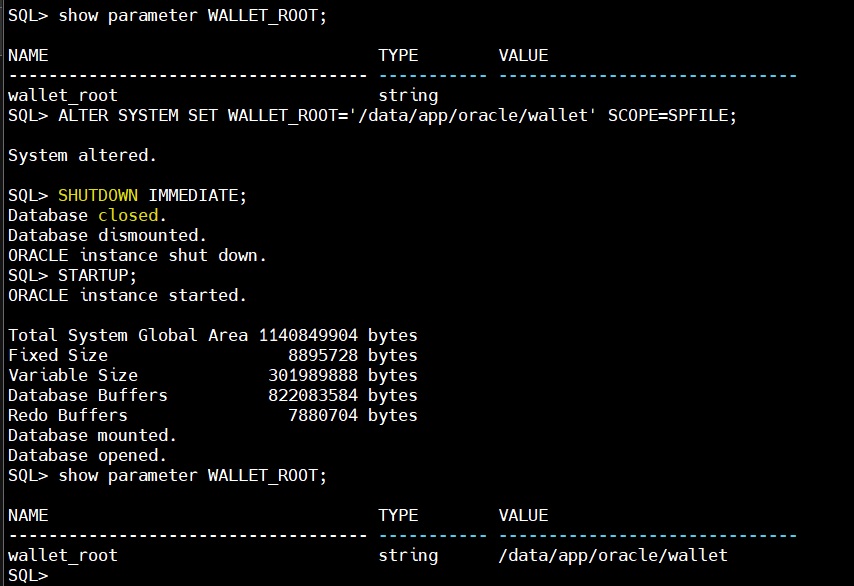
3.Setup TDE_CONFIGURATION parameter
Run the below set of commands to setup the TDE_CONFIGURATION parameter.
SHOW PARAMETER tde_configuration;
ALTER SYSTEM SET TDE_CONFIGURATION='KEYSTORE_CONFIGURATION=FILE' SCOPE=BOTH;
SHOW PARAMETER tde_configuration;Code language: JavaScript (javascript)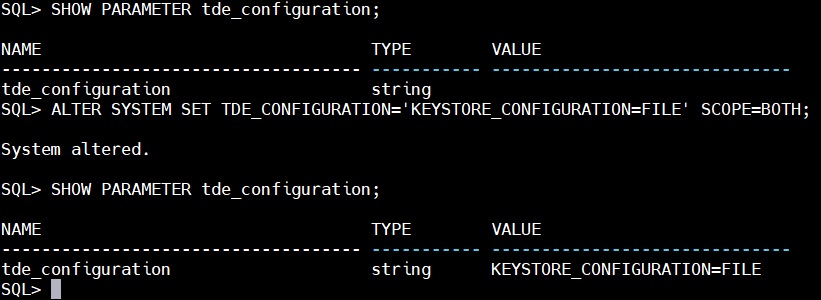
3.Create the Keystore (Wallet)
Create a password-protected wallet using following command
mkdir -p /data/app/oracle/wallet/tde
sqlplus / as sysdba
ADMINISTER KEY MANAGEMENT CREATE KEYSTORE '/data/app/oracle/wallet/tde' IDENTIFIED BY Welcome123;Code language: JavaScript (javascript)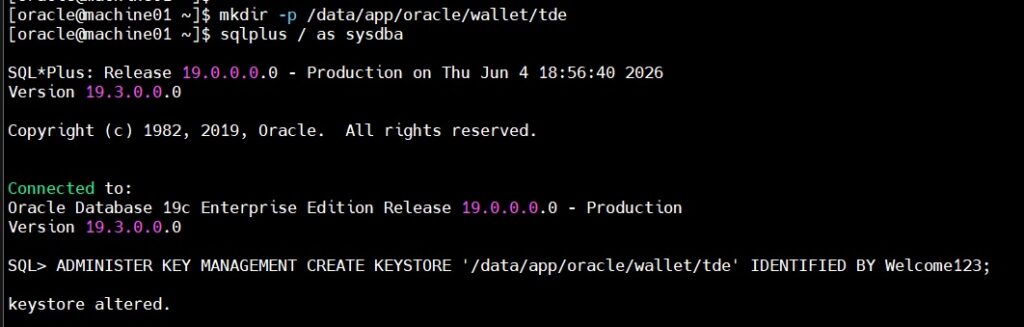
Use below command to check the status
set lines 200
col WRL_PARAMETER for a35
select * from v$encryption_wallet;Code language: JavaScript (javascript)
The Wallet status is showing as “CLOSED”. We will run the below command to open the wallet
ADMINISTER KEY MANAGEMENT SET KEYSTORE OPEN IDENTIFIED BY Welcome123;
Now, the status is showing as “OPEN_NO_MASTER_KEY” which means the wallet is created but does not contain any key. Using the below command we will create an encryption key in the wallet
administer key management set key using tag 'Test_Key' identified by Welcome123 with backup using 'TDE_backup';Code language: PHP (php)
So, the wallet is now on “OPEN” status which means the wallet is now completely configured along with encryption key stored in it. Using the below command we will check the key details.
set lines 250
col KEY_ID for a55
col TAG for a10
col CREATION_TIME for a40
col CREATOR for a10
col ACTIVATION_TIME for a40
select key_id,tag,keystore_type,creation_time,CREATOR,ACTIVATION_TIME from v$encryption_keys;Code language: JavaScript (javascript)
4.Enable Auto-Login Wallet
To avoid manually opening the wallet after every database restart we should have auto login sso file created in the wallet. Using below command we will enable the auto login wallet
ADMINISTER KEY MANAGEMENT CREATE AUTO_LOGIN KEYSTORE FROM KEYSTORE '/data/app/oracle/wallet/tde' IDENTIFIED BY Welcome123;Code language: JavaScript (javascript)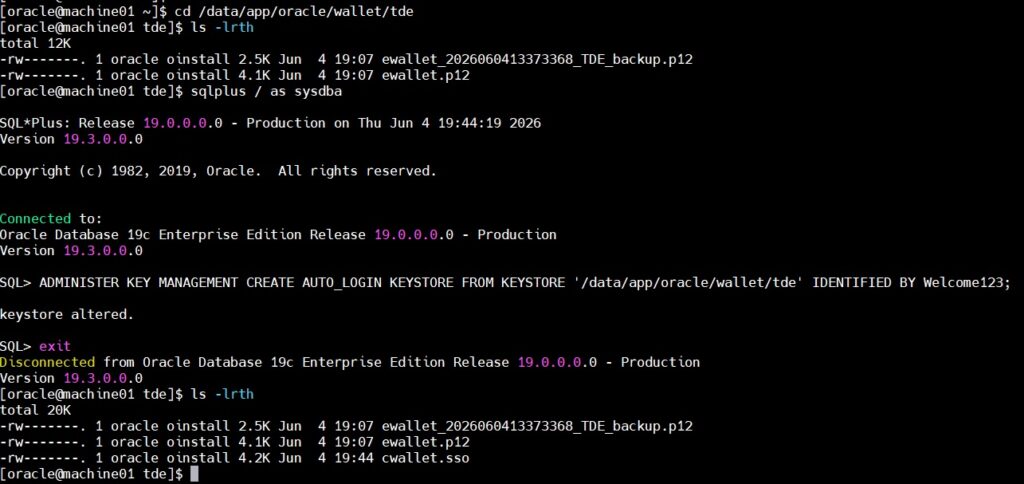
Now, let’s perform the tablespace encryption
There are two ways to encrypt the tablespaces, one encrypts tablespace using default encryption algorithm and the second is used to hardcode the encryption algorithm, to be used
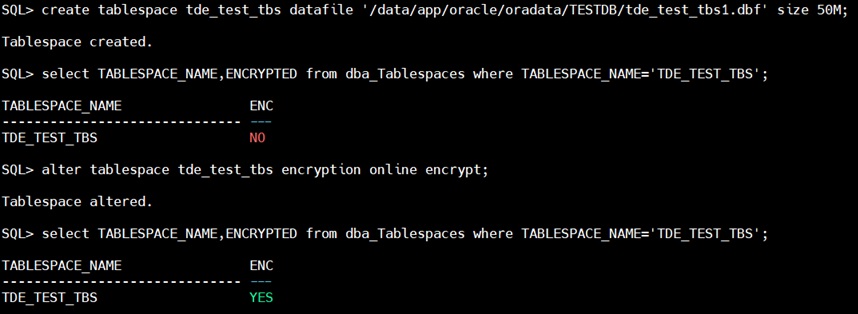
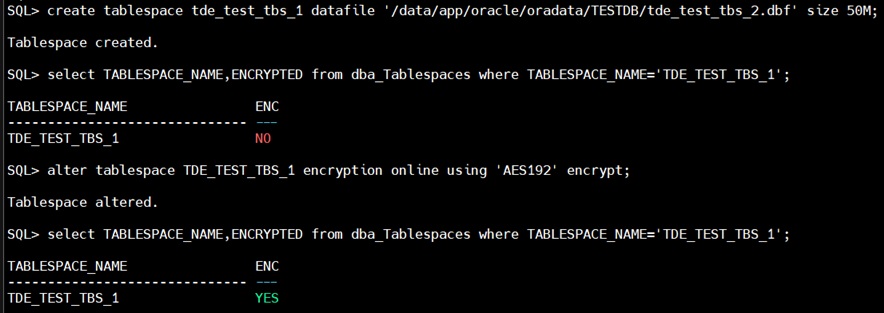
Below is the command to check the algorithm used for encrypting the tablespace
SELECT t.name AS tablespace_name,et.encryptionalg AS encryption_algorithm,et.status,et.encryptedts AS is_encrypted
FROM v$encrypted_tablespaces et
JOIN v$tablespace t ON t.ts# = et.ts#;Code language: PHP (php)
Conclusion
Transparent Data Encryption (TDE) is Oracle’s recommended feature for protecting sensitive data stored in a database. It encrypts tablespaces, columns, data files, and backups, helping keep data safe from unauthorized access. Since the encryption and decryption process happens automatically, applications can continue to work without any changes. Oracle Database 19c makes TDE setup and management easier with the WALLET_ROOT and TDE_CONFIGURATION parameters. To maintain a secure TDE environment, it is important to manage the wallet properly, back up encryption keys regularly, and rotate the master encryption key periodically.